14, Mar 2026
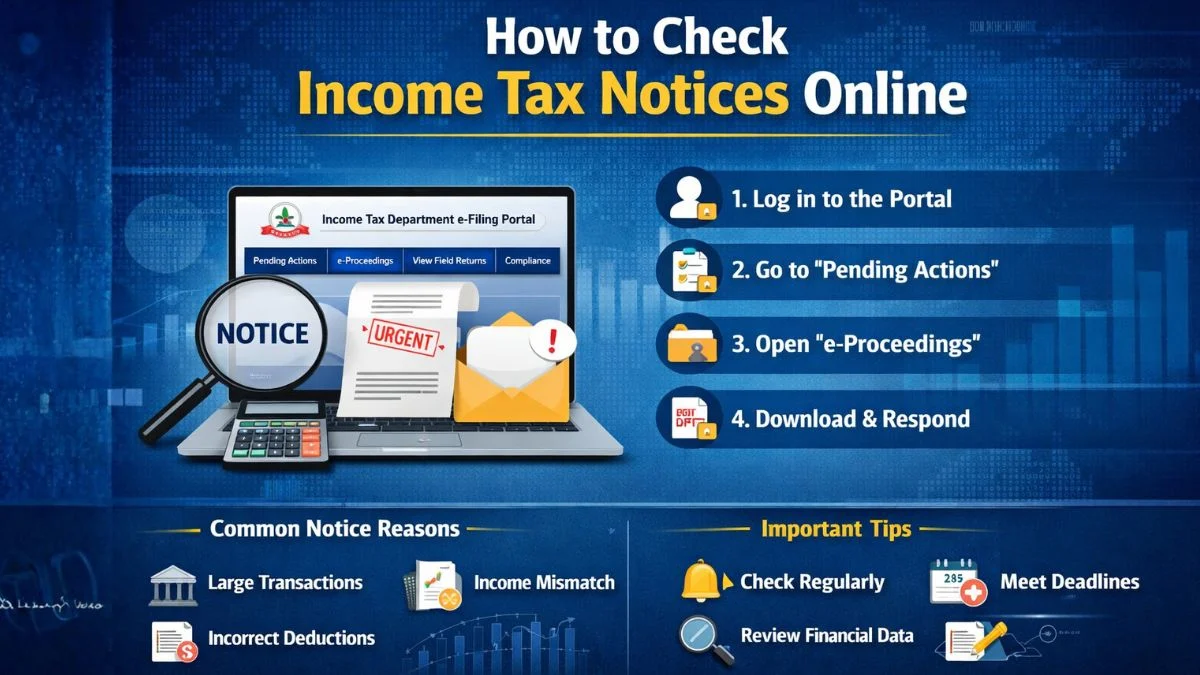
Understanding Notices from the Income Tax Department Getting a message from the Income Tax Department is something that immediately grabs your attention. Even if you’ve filed your return correctly, the word "notice" can still make you feel slightly uneasy. Most taxpayers assume the worst when they see it. But here’s the interesting part—not every notice is a sign of trouble. In many cases, it’s simply a system-generated communication asking for clarification or confirming financial information. The Income Tax Department uses advanced data systems today. Banks, employers, stock exchanges, and financial institutions regularly share financial transaction details with the government. These records are automatically compared with the information you provide while filing your tax return. If the system finds a mismatch—even a small one—it may generate a notice asking for verification. And thankfully, checking these notices is no longer complicated. Everything is available online. You just need to log in to the portal and view the details. Before understanding the process to check an income tax notice online in India, log in to the Income Tax Department's e-Filing portal, navigate to the "Pending Actions" tab, and click on "e-Proceedings." Notices can also be viewed under "View Filed Returns" or by checking for "Notice/Order Issued by ITD" under the "Compliance" menu; it helps to understand why these notices are issued in the first place. Most people think a notice always indicates a tax problem. That’s not really true. In fact, many notices are sent simply for verification purposes. The Income Tax Department wants to confirm whether the information you reported in your tax return matches the financial data they receive from other institutions. Here are some common reasons why a notice might be issued: Large financial transactions reported by banks Interest income from fixed deposits not declared Capital gains from shares or property not reported Incorrect deduction claims Mismatch between Form 26AS and tax return Missing information while filing the return Sometimes, the Income Tax Department just needs additional documentation to verify certain transactions. So if you receive a notice, it doesn’t necessarily mean there is wrongdoing involved. Often, it’s simply part of routine tax compliance. One thing that confuses many taxpayers is where exactly to find these notices. The portal of the Income Tax Department does not store everything in a single location. Depending on the type of communication, a notice can appear in different sections. That’s why it’s important to know where to check. You can usually view notices in the following areas: Pending Actions e-Proceedings View Filed Returns Compliance menu Dashboard alerts Each of these sections may contain different types of communication from the Income Tax Department. Checking all of them ensures you don’t miss an important notice. Now let’s understand the actual process. Once you know the steps, checking notices becomes very simple. Start by visiting the official Income Tax Department e-Filing portal. Enter the following details: PAN or Aadhaar number Password Captcha verification After logging in, you will reach your dashboard. This page shows alerts, compliance updates, and messages related to your account. Sometimes the notice will appear directly on the dashboard itself. But even if it doesn’t, there are other places where you can easily view it. Next, look at the top navigation menu. You will see an option called Pending Actions. Click on it. This section usually shows tasks that require your attention. If the income tax department has issued a notice that needs a response, it will most likely appear here. Inside this section, you may find: e-Proceedings e-Campaign Compliance Portal Among these, e-Proceedings is the most important section where taxpayers can view official notices. The e-Proceedings tab is where most digital communication between taxpayers and the Income Tax Department takes place. When you open it, you will be able to: View the notice. Download the Notice document Upload supporting documents Submit explanations or responses Everything happens digitally here. This means you usually don’t need to visit any tax office physically. Honestly, this system has made communication with the Income Tax Department much easier than before. Another place where you can view communication from the Income Tax Department is the View Filed Returns section. To access it: Click on the e-File menu Select View Filed Returns Here you will see all the tax returns you have filed for different financial years. Sometimes, the Income Tax Department attaches a notice directly to the return you filed. In such cases, the document will appear alongside the return details. Many taxpayers overlook this section, but it’s definitely worth checking. There is another section that many people miss. Inside the Compliance menu, the portal sometimes displays Notice/Order. Issued by ITD. If the income tax department has issued any compliance-related communication, you can view it here. These notices may relate to verification requests, transaction confirmations, or clarification requests. Checking this section regularly ensures you don’t miss any important notices. Once you locate the notice, downloading it takes only a few seconds. Follow these steps: Open the Notice on the portal Click "View Notice." Select Download PDF The downloaded document usually includes: Section under which the Notice was issued Reason for the Notice Documents required Deadline for response Take some time to read it carefully. Understanding the Notice properly helps you respond correctly. The Income Tax Department issues different types of notices depending on the situation. Here are some common ones. This is sent after your tax return is processed and confirms whether your calculations match the department’s records. Issued when the return filed contains missing or incorrect details. The Income Tax Department may request additional documents or clarification. Issued when the department believes some income may have escaped assessment. Most of these notices can be easily accessed online, and you can view them directly through the portal. Even though the process is simple, many taxpayers still make small mistakes. Let’s talk about a few of them. Ignoring portal notifications Missing response deadlines Responding without understanding the notice Not checking financial data first These simple steps can prevent unnecessary complications. Understanding to check an income tax notice online in India, log in to the Income Tax Department's e-Filing portal, navigate to the "Pending Actions" tab, and click on "e-Proceedings." Notices can also be viewed under "View Filed Returns" or by checking for "Notice/Order Issued by ITD" under the "Compliance" menu. is important for every taxpayer today. The Income Tax Department has made tax communication much easier by shifting most processes online. By logging into the portal regularly and checking sections like Pending Actions, e-Proceedings, View Filed Returns, and the Compliance menu, you can quickly view any notice issued to you. And once you go through the process once or twice, it becomes very straightforward. Just log in, check the section, and view the notice. If you’ve received a notice from the income tax department and are unsure how to view it or respond properly, the experts at Callmyca.com can guide you through the process and help handle your tax compliance smoothly and confidently.
Wh
Why the Income Tax Department Sends Notices
Where You Can View Income Tax Notices Online
Step-by-Step Guide to Check Income Tax Notices Online
Step 1: Log in to the Income Tax Portal
Step 2: Check the Pending Actions Section
Step 3: Open the e-Proceedings Section
Checking Notices Under View Filed Returns
Checking Notices in the Compliance Section
How to Download the Notice
Common Types of Income Tax Notices
Section 143(1) Intimation
Section 139(9) Defective Return
Section 142(1) Inquiry Notice
Section 148 Notice
Common Mistakes Taxpayers Make
Some taxpayers rely only on email alerts, but sometimes the notice appears only inside the portal.
Every notice has a response timeline. Ignoring it can lead to penalties.
Always read the notice carefully before submitting a response.
Before replying, it’s always a good idea to review AIS, Form 26AS, and bank statements.
Final Thoughts