Why Income Tax Notices Come With Password Protection
If you’ve ever downloaded a tax document from the income tax portal, you’ve probably noticed something frustrating.
You open the PDF… and it asks for a password.
This happens with many documents, including notices, ITR-V acknowledgments, and demand notices. The reason is simple: security.
Income tax documents contain sensitive personal and financial information. So the department protects them with a standardized password format.
But here’s the good news.
The password is not random. It follows a very simple rule that applies to most taxpayers.
Once you know the pattern, opening these files becomes easy.
Demand Notice Password Income Tax: The Exact Format
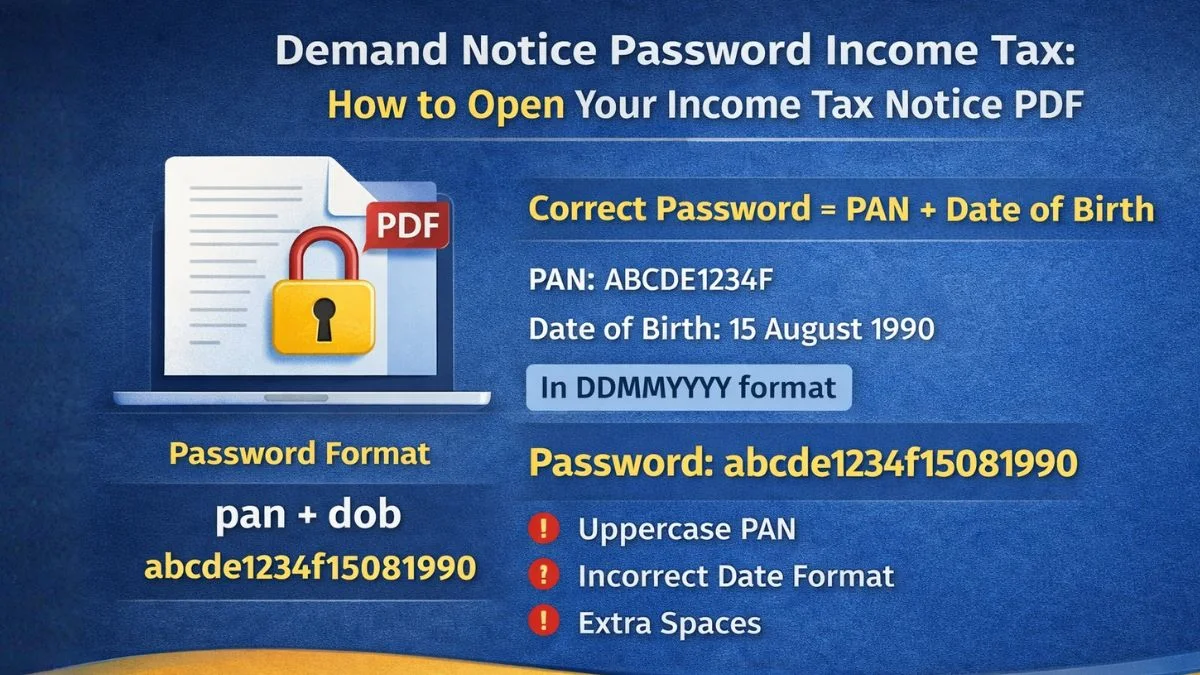
The password to open an income tax demand notice (or ITR-V/Intimation) is a combination of your PAN and your date of birth in DDMMYYYY format.
Yes, that’s it.
In other words, the password is:
your PAN (in lowercase) followed by your date of birth in DDMMYYYY format
Here’s a quick example to make it clear.
-
PAN: ABCDE1234F
-
Date of Birth: 15 August 1990
Your password would be:
abcde1234f15081990
Simple once you know the rule.
Many people try uppercase letters or different date formats and get confused when the PDF doesn’t open. The key is remembering that the PAN must always be in lowercase.
How to Open an Income Tax Demand Notice
Opening the document is straightforward once you know the password format.
Follow these steps:
-
Download the demand notice PDF from the Income Tax portal.
-
Open the PDF using any standard PDF reader.
-
Enter the password when prompted.
-
Use the format your PAN followed by your date of birth in DDMMYYYY format.
If the password is correct, the document opens instantly.
If it doesn’t open, double-check two things:
-
PAN must be in lowercase
-
The date must be written in DDMMYYYY format
Even a small formatting mistake can prevent the file from opening.
What Information a Demand Notice Contains
Once you successfully open the document, you’ll see detailed information about your tax situation.
Most notices contain the department’s analysis of your tax return.
In fact, the document usually summarizes the Income Tax Department's assessment of your ITR.
This includes:
-
Tax calculated by the department
-
Tax already paid by the taxpayer
-
TDS or advance tax details
-
Interest calculations
-
Any additional demand payable
Sometimes the notice may show a tax refund instead of a demand.
So don’t assume it always means you owe money.
Common Income Tax Documents That Use the Same Password
The same password rule applies to several tax-related documents.
This is why many people search for "demand notice password income tax" when they encounter password-protected PDFs.
Here are some documents that typically follow the same pattern:
-
ITR-V acknowledgment
-
Intimation under Section 143(1)
-
Demand notice documents
-
Assessment notices
-
Tax refund intimation letters
All of these usually require your PAN (in lowercase) followed by your date of birth in DDMMYYYY format.
Once you remember this pattern, you’ll rarely get stuck again.
Different Password Types Used by the Income Tax Department
While most taxpayer documents follow the same rule, it’s helpful to understand that there can be different password types depending on the document type.
For example:
Individual Taxpayer Documents
Most individual tax documents use the following:
Enter your PAN in lowercase, followed by your date of birth in DDMMYYYY format
Company Documents
For companies or entities, the password may combine:
-
PAN
-
Date of incorporation
But for most individual taxpayers, the standard format remains unchanged.
That’s why the search query "demand notice password income tax" usually leads to the same answer.
Why People Often Enter the Wrong Password
Interestingly, the password format is simple, yet many people still struggle.
Here’s why.
Uppercase PAN
Many users type PAN exactly as printed on their PAN card.
But remember:
Enter your PAN in lowercase, followed by your date of birth in DDMMYYYY format
Uppercase letters will not work.
Incorrect Date Format
People sometimes enter the following:
-
DD/MM/YYYY
-
YYYYMMDD
-
MMDDYYYY
The correct format is always DDMMYYYY without slashes.
Extra Spaces
Spaces before or after the password can also cause errors.
It sounds small, but it happens frequently.
What to Do After Opening the Demand Notice
Once you open the document, don’t just close it immediately.
Take a moment to review the details carefully.
Look for:
-
The assessment year mentioned
-
The tax demand amount
-
The reason for the notice
-
Instructions from the department
Since the document summarizes the Income Tax Department's assessment of your ITR, it’s important to check whether the information matches your return.
If there’s a mismatch, you may need to respond through the income tax portal.
How to Check Demand Notices Online
You can also check notices directly through the income tax portal.
The process usually looks like this:
-
Log in to the Income Tax e-filing portal
-
Go to Pending Actions or e-Proceedings
-
Select "View Notices."
-
Download the relevant notice
Once downloaded, the file will again require the standard password format:
your PAN followed by your date of birth in DDMMYYYY format
This consistent system helps maintain security while still allowing taxpayers easy access to their documents.
Final Thoughts
The demand notice password income tax requirement often confuses taxpayers, but the solution is actually very simple.
Just remember this rule:
The password to open an income tax demand notice (or ITR-V/Intimation) is a combination of your PAN (in lowercase) and your date of birth in DDMMYYYY format.
In short:
your PAN followed by your date of birth in DDMMYYYY format
Once you enter it correctly, the PDF will open and show the details that summarize the Income Tax Department's assessment of your ITR.
If you ever receive tax notices and feel unsure about how to interpret them or respond properly, it’s always better to consult professionals. Platforms like Callmyca.com help taxpayers understand notices, resolve demands, and handle income tax compliance smoothly.