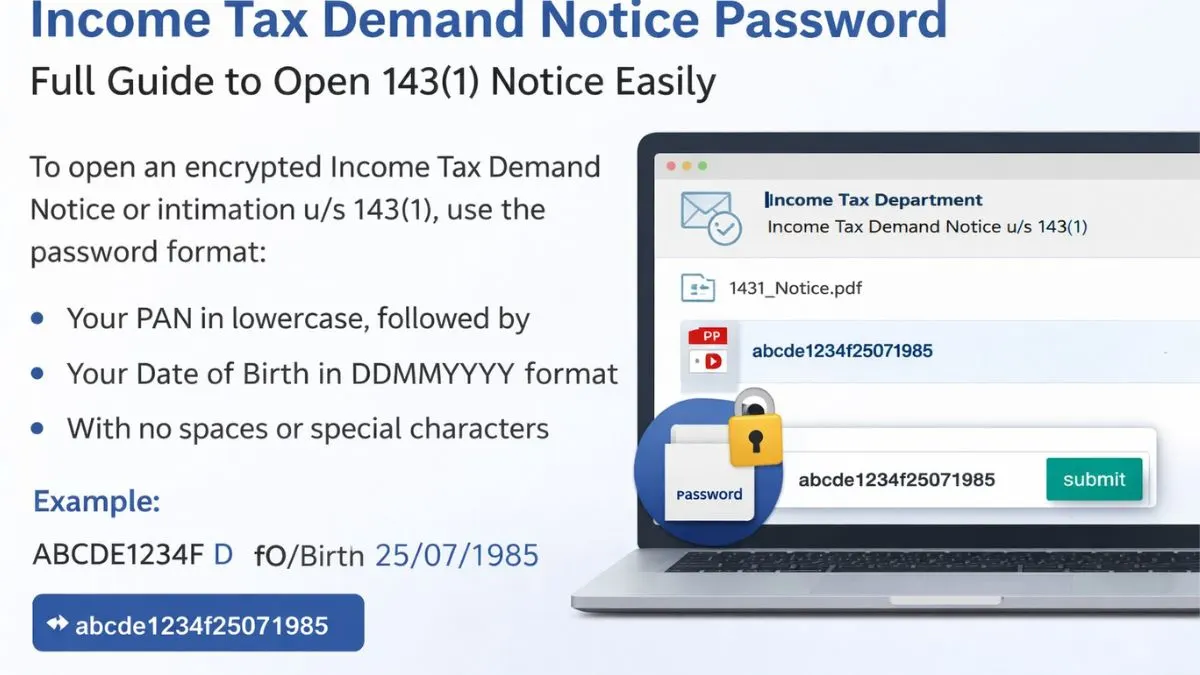
Income Tax Demand Notice Password—Full Guide to Open 143(1) Notice Easily
If you have recently received an email from the Income Tax Department, there is a high chance that it contains an attachment like an income tax intimation or demand notice. Many taxpayers panic at this stage because they are unable to open the file. The reason is simple—the file is password protected.
Understanding the correct income tax demand notice password is important to access your document without delay. Whether it is an income tax intimation u/s 143(1) online or a notice under section 133(6), the password format remains structured and predictable. In this guide, we will break down everything in a simple, human-friendly way so you never struggle again.
What is an Income Tax Demand Notice or Intimation u/s 143(1)?
An income tax intimation u/s 143(1) is a communication sent by the Income Tax Department after processing your return. It compares your filed return with department records like Form 26AS, AIS, and TDS details. Based on this, it may show:
-
No demand (everything is correct)
-
Refund (you paid extra tax)
-
Demand (you need to pay more tax)
On the other hand, a notice under section 133(6) is usually sent to request additional information or clarification.
Both documents are sent in password-protected PDF format for security reasons. That is why understanding the income tax notice password is essential.
Income Tax Demand Notice Password Format
The password to open an income tax demand notice or intimation is very simple, but most people make mistakes while entering it.
👉 The correct format is:
Your PAN in lowercase Date of Birth in DDMMYYYY format
There should be no spaces or special characters.
Example of Income Tax Intimation u/s 143(1) Password
-
PAN: ABCDE1234F
-
Date of Birth: 15/08/1990
👉 Password:
abcde1234f15081990
Another Example
-
PAN: ABCDE1234F
-
DOB: 10/04/1990
👉 Password:
abcde1234f10041990
Key Points to Remember About Password
Many users fail to open the file because they ignore small details. Keep these points in mind:
-
Always use your PAN in lowercase
-
Enter your date of birth in DDMMYYYY format
-
Do not add spaces
-
Do not use uppercase letters
-
Ensure the date format is correct (DD first, then MM)
Even a small mistake can make the file appear locked.
Different Password Types in Income Tax Notices
Although most income tax documents follow the same password pattern, there can be slight variations depending on the document type.
1. Income Tax Intimation u/s 143(1) Password
This is the most common type. The password is:
👉 PAN (lowercase) DOB (DDMMYYYY)
2. Income Tax Notice u/s 133(6) Password
In most cases, the password remains the same:
👉 PAN in lowercase Date of Birth
However, sometimes the department may provide specific instructions in the email body.
3. Income Tax Return Password Example
For some documents like ITR-V or acknowledgement, the format may be:
👉 PAN (lowercase) Date of Birth or Incorporation Date
4. Company Password Format
If the notice is issued to a company:
👉 PAN (lowercase) Date of Incorporation (DDMMYYYY)
How to Download Income Tax Intimation Online
If you did not receive the email or lost the file, you can download it again using the income tax login.
Follow these steps:
-
Visit the Income Tax e-Filing portal
-
Log in using your PAN and password
-
Go to e-Proceedings / View Filed Returns
-
Select the relevant assessment year
-
Download the intimation or notice
Once downloaded, use the same income tax intimation us 143 1 password format to open the file.
Step-by-Step: How to Open Income Tax Notice PDF
Opening your file is simple if you follow the correct steps:
-
Download the PDF from your email or portal
-
Open the file in a PDF reader
-
Enter your password in this format:
-
PAN in lowercase
-
DOB in DDMMYYYY
-
-
Click submit
If entered correctly, your file will open instantly.
Common Mistakes While Entering Password
Many taxpayers think the file is corrupted, but in reality, they are entering the wrong password. Here are common mistakes:
-
Using PAN in uppercase
-
Adding spaces between PAN and DOB
-
Using incorrect date format (MMDDYYYY instead of DDMMYYYY)
-
Entering wrong date (using filing date instead of birth date)
-
Copy-pasting with hidden spaces
Always type the password manually to avoid errors.
What If the Password Is Not Working?
If your income tax demand notice password is not working, try the following:
-
Double-check your PAN
-
Confirm your date of birth
-
Ensure lowercase letters
-
Try retyping instead of pasting
-
Open the file in a different PDF reader
If it still does not work, you can re-download the file using the income tax login. Sometimes files get corrupted during download.
Why Income Tax Notices Are Password Protected
The Income Tax Department uses password protection for security reasons. These documents contain sensitive financial information like
-
Income details
-
Tax paid
-
Refund or demand
-
Bank details
To prevent unauthorized access, the system uses a fixed password format based on personal information like PAN and date of birth.
Understanding the Demand in Notice
Once you open the file, do not panic. Read it carefully. If it shows demand, it usually means:
-
TDS mismatch
-
Incorrect income reporting
-
Missing AIS or 26AS data
-
Calculation difference
You can respond to the notice through the income tax login portal.
How to Respond to Income Tax Demand Notice
If there is a demand, you have two options:
1. Agree with Demand
-
Pay the tax
-
Submit response online
2. Disagree with Demand
-
Submit clarification
-
Upload supporting documents
Always respond within the given timeline to avoid penalties.
Pro Tip to Avoid Future Notices
To avoid such notices in the future:
-
Always check Form 26AS, AIS, and TIS
-
Match your income before filing ITR
-
Verify TDS entries
-
Use professional help if needed
This reduces chances of mismatch and unnecessary demand notices.
Final Thoughts
Understanding the income tax demand notice password is not complicated once you know the correct format. It is always your PAN in lowercase followed by your date of birth in DDMMYYYY format. Whether it is income tax intimation u/s 143(1) online password or income tax notice password 133(6), the logic remains mostly the same.
The key is attention to detail. One small mistake can prevent access, causing unnecessary stress. Always double-check your entries and keep your PAN and DOB handy.
👉 Still confused about your notice or facing issues in responding? Let experts handle it for you—visit Callmyca.com and get professional assistance for all your income tax notices and filings.