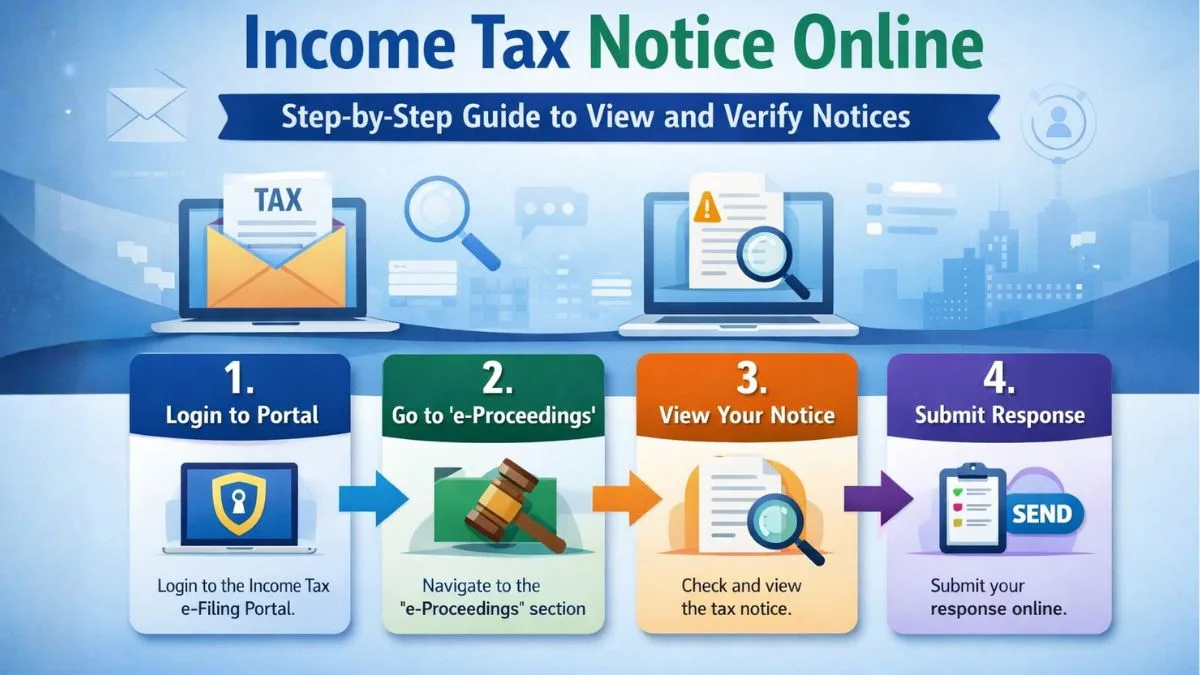
Check the income tax notice. Online: Step-by-Step Guide to View and Verify Notices
Why You Should Check Income Tax Notices Online
Receiving a notice from the income tax department can feel stressful at first. Most people immediately assume something has gone wrong with their tax filing. But here’s the interesting part—many notices are simply requests for clarification or information.
These days, the government has made things much easier. Instead of waiting for physical letters, you can check your income tax notice online through the official e-Filing portal.
And honestly, this is something every taxpayer should know how to do.
Most people don’t realize this, but almost all tax communication now happens digitally. The income tax department sends alerts through your registered email, SMS, and your portal dashboard.
So if you ever receive a message saying a notice has been issued, the first step is simple:
Go online and check it.
The Official Portal Where Notices Are Available
The Indian Income Tax Department maintains a centralized portal for taxpayers. This portal allows you to:
-
File your returns
-
Respond to tax queries
-
Track refunds
-
View Notice details
-
Submit documents
In fact, income tax notices can be checked online by logging into the Income Tax Department's e-Filing portal using your PAN, navigating to the "Pending Actions" or "e-Proceedings" tab, and reviewing alerts. Notices can also be verified pre-login using the "Authenticate Notice/Order" feature with a Document Identification Number (DIN).
That one system manages almost everything.
Which means if you receive any notice, the first place you should go is the e-Filing portal.
No need to panic.
Just log in and check.
Step-by-Step: How to Check Income Tax Notice Online
Let’s understand this in a practical way.
If you want to check your income tax notice online, follow these steps carefully.
Step 1: Visit the Income Tax e-Filing Portal
Go to the official Income Tax website:
This is the only official portal used by the department.
Avoid clicking suspicious links in emails.
Instead, open the portal directly.
Step 2: Log in Using PAN and Password
Click on the login button and enter:
-
PAN number
-
Password
-
Captcha code
Once logged in, your taxpayer dashboard will appear.
This dashboard shows alerts, pending actions, and communication from the income tax department.
Step 3: Navigate to Pending Actions
Now look for the Pending Actions tab.
Under this section you will find the following:
-
e-Proceedings
-
Response to Outstanding Demand
-
Compliance Notices
If a Notice has been issued to you, it will appear here.
Click the option to View Notice.
Step 4: Open the Notice Details
After clicking View Notice, you will see:
-
Section under which the Notice is issued
-
Issue date
-
Response deadline
-
Description of the query
This is where the online view becomes helpful.
You can download the PDF copy of the notice directly.
Take your time and read it carefully.
Don’t rush.
Step 5: Understand What the Notice Means
Here’s something important.
Not every notice means you made a mistake.
Sometimes the income tax department simply wants confirmation of certain transactions.
For example:
-
High-value bank deposits
-
Stock market trades
-
Foreign remittances
-
Property purchases
The department cross-checks data using systems like AIS and Form 26AS.
If something looks different from your return, a notice may be issued.
So again, stay calm.
Just check the details.
How to Verify an Income Tax Notice Without Login
Now here’s something many taxpayers don’t know.
You can verify a notice even without logging into the portal.
Yes, really.
The Income Tax department provides a public verification feature called Authenticate Notice / Order.
This helps taxpayers confirm whether a notice is genuine.
Steps to Authenticate a Notice
To verify a notice, follow these steps:
-
Visit the Income Tax portal
-
Click Authenticate Notice / Order
-
Enter the following details:
-
PAN number
-
Document Identification Number (DIN)
-
Assessment year
-
Mobile number
After submitting the information, the system will show the online view of the notice.
This confirms whether the notice is genuine.
Why DIN Is Important
The Document Identification Number (DIN) is extremely important.
Every official notice issued by the income tax department must contain a DIN.
This system was introduced to prevent fake tax notices.
So whenever you receive a notice, always check the DIN.
If the DIN is missing, it could be suspicious.
Common Types of Income Tax Notices
Now let’s talk about something practical.
When you check your income tax notice online, you may see different types of notices.
Each one has a different purpose.
Here are some common ones.
Section 143(1)
This is the most common notice.
It is basically an intimation after your return is processed.
It may show:
-
Refund issued
-
Additional tax payable
-
No change in return
Most taxpayers receive this.
Section 139(9)
This notice means your return is defective.
Some common reasons include:
-
Missing income details
-
Incorrect deduction claims
-
Mismatch in tax data
You simply need to correct the return and submit again.
Section 142(1)
This notice requests additional information.
For example:
-
Bank statements
-
Investment proofs
-
Income explanations
You can respond directly through the portal.
Section 148
This is issued when the income tax department believes income has escaped assessment.
In simple words, they think some income was not reported.
This requires careful response.
What To Do After You View an Income Tax Notice
Once you view the notice, don’t ignore it.
That’s a mistake many taxpayers make.
Every notice has a response deadline.
Missing it can create bigger problems later.
So here’s what you should do.
First, read the notice properly
Understand:
-
What information is requested
-
Which assessment year it relates to
-
What documents may be required
Second, gather your documents
Depending on the notice, you may need the following:
-
Bank statements
-
Form 16
-
Investment proofs
-
Capital gain reports
-
Business income records
Third, submit your response online
The Income Tax portal allows you to reply digitally.
Simply go to:
Pending Actions → e-Proceedings
Upload documents and submit your explanation.
The entire process happens through online view.
No physical visits required.
Common Reasons Why Taxpayers Receive Notices
Let’s be honest.
Many taxpayers are surprised when they receive a notice.
But usually the reasons are simple.
Here are some common triggers.
High-Value Transactions
Banks and financial institutions report large transactions to the income tax department.
Examples include:
-
Large cash deposits
-
Property purchases
-
Credit card spending
If these do not match your return, a notice may be issued.
AIS and 26AS Mismatch
AIS now captures many financial activities.
If income in AIS differs from your tax return, the system may flag it.
Which means you may need to check and explain.
Late Filing
Sometimes a notice is issued simply because returns were filed late.
Or because taxes were unpaid.
Random Verification
Yes, sometimes the department conducts random verification.
Even if everything is correct.
So don’t assume wrongdoing immediately.
Just check and respond.
Mistakes To Avoid When You Receive a Tax Notice
Many taxpayers panic and make mistakes.
Let’s avoid that.
Here are some things you should not do.
Ignoring the Notice
Never ignore a notice.
The problem will not disappear.
Instead, penalties may increase.
Responding Without Understanding
Always read the notice carefully.
If needed, consult a tax professional.
Uploading Wrong Documents
Make sure every document matches the query raised.
Incorrect submissions can complicate the case.
Why Online Notice Checking Is Helpful
The shift to online view has made tax communication much simpler.
Earlier, taxpayers had to rely on postal letters.
Now you can:
-
check income tax notice online instantly
-
download documents
-
submit replies
-
track status
Everything happens on the portal.
And honestly, this system saves a lot of time.
Final Thoughts
Getting a notice from the income tax department might feel intimidating at first.
But once you understand how the system works, it becomes much easier to handle.
The key is simple:
Always check the income tax notice online through the official portal.
Use the View Notice option, read the details carefully, and respond within the deadline.
Remember, Income tax notices can be checked online by logging into the Income Tax Department's e-Filing portal using your PAN, navigating to the "Pending Actions" or "e-Proceedings" tab, and reviewing alerts. Notices can also be verified pre-login using the "Authenticate Notice/Order" feature with a Document Identification Number (DIN).
And once you know this process, dealing with a notice becomes far less stressful.
If you received an income tax notice and want expert help responding correctly, you can explore professional assistance through Callmyca.com, where tax experts help taxpayers review notices, prepare responses, and resolve compliance issues quickly and safely.