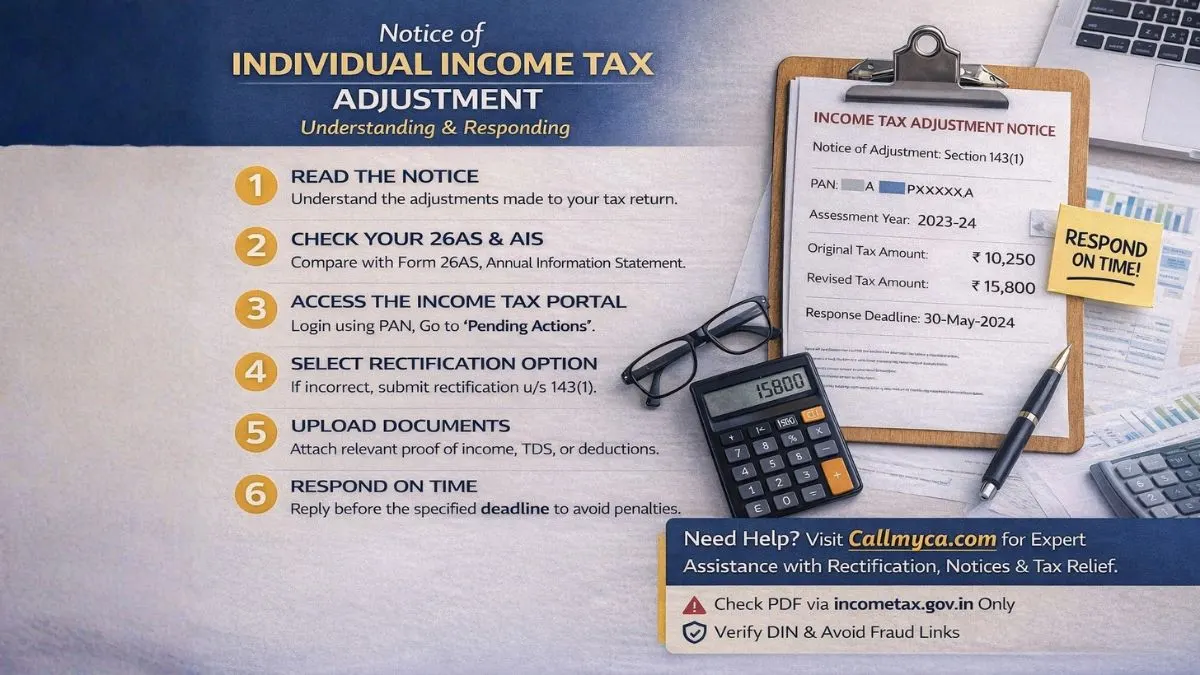
Summary
A notice of individual income tax adjustment explains changes made to your return by the Income Tax Department. Learn about rectification of income tax return u/s 143(1), income tax notice PDF download, income tax correction online, time limit for rectification of income tax return, how to download notice from income tax portal, where to check income tax notice on portal, income tax notice under section NA PDF, and understand income tax notice format.
Filing your income tax return is something most people do with a lot of care. You collect documents, check figures, and finally click “Submit” with relief.
But then, one fine day, you receive a message or email about a notice of individual income tax adjustment.
And suddenly, your mind starts racing.
“Did I make a mistake?”
“Will I have to pay extra tax?”
“Is there a problem with my return?”
You open Google and start searching for things like rectification of income tax return u/s 143(1), income tax correction online, or income tax notice PDF download.
If this sounds familiar, don’t worry. You’re not alone.
What Is a Notice of Individual Income Tax Adjustment?
A notice of individual income tax adjustment is an official message sent by the Income Tax Department when they make changes to your filed return.
These changes usually happen because of:
- Small calculation mistakes
- TDS mismatch
- Wrong interest amount
- Deduction errors
- Mismatch with Form 26AS or AIS
- Adjustment of refund against old dues
Most of these are system-generated adjustments under Section 143(1) or Section 245.
It does NOT mean you have done something illegal.
It simply means the system found some difference and corrected it.
Why Do Taxpayers Receive These Notices?
Many people think only careless filers get notices. That’s not true.
Even honest taxpayers receive notices due to
- Mismatches in reported income
- Errors in tax deduction at source
- Employer delay in updating TDS
- Bank account issues
- Technical problems
- Duplicate entries
This is why learning why salaried employees get income tax notices is very important.
Most notices are routine.
What Is Rectification of Income Tax Return U/S 143(1)?
Rectification of an income tax return u/s 143(1) is your right to correct mistakes in a processed return.
You can use it when:
- Your TDS is missing
- Income is wrongly calculated
- Deductions are ignored
- Interest is wrongly charged
- Refund is reduced incorrectly
The best part?
You can do it online from home.
No office visits. No long queues.
How to Do Income Tax Notice PDF Download
If you received a message and want to check details, you must first do an income tax notice PDF download.
Follow these steps:
- Visit Income Tax Portal
- Log in using PAN and password
- Click “e-File” → “Income Tax Returns.”
- Open “View Filed Returns.”
- Select the year
- Click “Download Intimation.”
Your income tax notice under section NA PDF or 143(1) notice will be saved.
Always keep this document safe.
How to Download Notice from Income Tax Portal
Many people ask how to download a notice from the income tax portal.
Here is the easy way:
- Log in to your account
- Click on “Pending Actions.”
- Open “e-Proceedings”
- Select “View Notices.”
- Download the file
This section works like your personal notice inbox.
Where to Check Income Tax Notice on Portal
If you’re confused about where to check the income tax notice on the portal, remember this:
All notices are available under:
- Pending Actions
- e-Proceedings
- Worklist
- View Filed Returns
This is your income tax notice portal.
Make it a habit to check it regularly.
Understanding Income Tax Notice Format
Before responding, you should understand the income tax notice format.
A typical notice contains:
- Your PAN and name
- Assessment year
- Section applied
- Original return details
- Adjustments made
- Revised tax/refund
- Deadline to respond
Reading this properly avoids mistakes.
Never rush.
How to Do Income Tax Correction Online
If you find something wrong, you can easily do an income tax correction online.
Steps:
- Login
- Go to “Services” → “Rectification.”
- Select assessment year
- Choose error type
- Upload documents
- Submit
After this, you can track your request online.
Simple and paperless.
Time Limit for Rectification of Income Tax Return
Many people delay action and regret it later.
The time limit for rectification of income tax return is
👉 4 years from the end of the financial year in which the order was passed.
Example:
Order in FY 2022–23 → Rectification till March 2027.
Still, don’t wait.
Earlier is always better.
What If Your Refund Is Adjusted? (Section 245)
Sometimes, your refund is adjusted against old dues.
You will get a notice explaining:
- Refund amount
- Pending demand
- Adjustment details
Always verify this.
Many old demands are incorrect.
How to Respond to an Adjustment Notice
When you receive a notice, follow this calm approach:
Step 1: Read Slowly
Don’t panic. Read everything.
Step 2: Match Documents
Compare with Form 16, 26AS, AIS, and bank statements.
Step 3: Decide
- If correct → Accept
- If wrong, rectify.
Step 4: Respond Online
Use the portal only.
Never ignore.
Why Adjustment Notices Matter
A notice of individual income tax adjustment is not something to fear. It is part of the system that keeps tax records accurate. Many taxpayers panic when they receive such notices, thinking they are in trouble. In reality, most adjustments are technical and easy to resolve. These notices highlight mismatches in income, tax payments, or deductions and give you a chance to fix them. Ignoring such notices can lead to penalties, interest, and unnecessary stress later. Moreover, corrected and processed returns act as strong financial proof for loans, visas, and business registrations. They also show that you are a responsible and compliant taxpayer. When you understand these notices and respond on time, you protect your financial reputation and avoid future disputes. Instead of seeing adjustment notices as a problem, see them as an opportunity to keep your records clean and accurate.
Common Mistakes That Lead to Adjustments
Try to avoid:
- Not checking AIS/TIS
- Wrong TDS data
- Fake deductions
- Filing without verification
- Wrong bank details
- Ignoring notices
Care during filing saves months of trouble.
How to Authenticate Income Tax Notices
To stay safe from fraud:
- Verify on the portal.
- Check DIN number
- Avoid unknown links
- Log in and confirm
Only trust what appears in your dashboard.
Final Thoughts
A notice of individual income tax adjustment is not bad news. It is simply the department’s way of keeping records accurate. By understanding rectification of income tax return u/s 143(1), online income tax correction, time limits, notice format, and download steps, you can manage your taxes confidently.
👉 If you want stress-free support for rectification, notice replies, refunds, and tax planning, visit Callmyca.com today and let our experts handle everything while you focus on your life and career.