summary
An ITR income tax return processed notice confirms that your return has been verified by the department. Learn how to check e-filing refund status, income tax return acknowledgement, income tax notice PDF download, ITR refund status check by PAN number, e-filing ITR status, and what to do if return processing is in progress for a long time or an income tax refund is pending. Also understand income tax login and ITR login steps easily.
Filing your Income Tax Return (ITR) is a big relief. But real peace of mind comes only when you receive the ITR income tax return processed notice. Until then, many taxpayers keep searching for answers like “e-filing refund status,” “income tax return acknowledgement,” or “return processing has is in progress for long time.” ”.
If you are confused about what this notice means, how long it takes, and what steps to follow next, this guide is for you.
What Is an ITR Income Tax Return Processed Notice?
When you file your return on the Income Tax portal, the department reviews your details. After checking your income, deductions, TDS, AIS, and other records, they issue an intimation under Section 143(1).
This is known as the ITR processed notice.
It confirms that:
- Your return has been examined
- Your data matches (or does not match) department records
- Your final tax position is decided
In short, it means your return is officially processed.
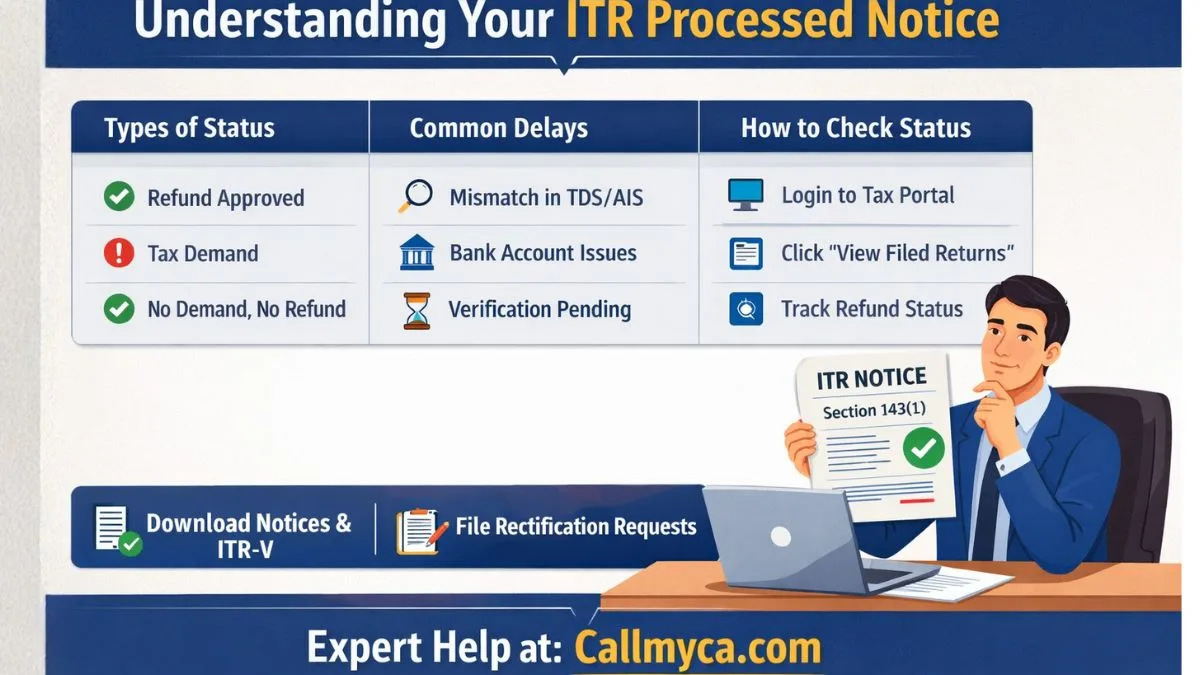
Types of ITR Processed Status
After processing, your return can show one of these results:
1. Processed with Refund
This means:
- You paid extra tax
- The department will send your refund
- You can track it using e-filing refund status
2. Processed with Demand
This means:
- You still need to pay some tax
- There is a mismatch or short payment
- You must respond online
3. No Demand, No Refund
This means:
- Your tax calculation is perfect
- No further action is required
Each of these will be mentioned clearly in your income tax return processed notice.
How Long Does It Take to Process ITR?
Normally, the Income Tax Department processes returns within 20–45 days after verification.
However, as per rules, an ITR filed should be processed within 9 months from the end of the financial year.
So if you filed in July 2025 for FY 2024–25, your return can legally be processed till December 2026.
But most cases are completed much earlier.
Why Is My Return Processing Taking So Long?
Many taxpayers complain:
“Return processing has been in progress for a long time.”
This can happen due to:
- Heavy workload during peak season
- Mismatch in TDS or AIS
- Bank account not validated
- Pending verification
- Technical issues
- High-value transactions
In such cases, your income tax refund pending status may remain unchanged for weeks.
Do not panic. It is common.
How to Check E-Filing ITR Status Online
To check your e-filing ITR status, follow these steps:
- Visit the Income Tax Portal
- Click on Income Tax Login
- Enter PAN, password, and captcha
- Go to “View Filed Returns.”
- Select the relevant assessment year
Here you can see whether your return is:
- Filed
- Verified
- Processed
- Refund issued
This is the easiest way to stay updated.
ITR Refund Status Check by PAN Number
If your return is processed with a refund, you can track it using your PAN.
Steps:
- Log in to the portal
- Open “Refund Status” section
- Enter PAN and assessment year
- Submit
You can also track refunds through NSDL using PAN.
This is called the ITR refund status check by PAN number.
Understanding Income Tax Return Acknowledgement (ITR-V)
After filing, you receive a document called an income tax return acknowledgement, also known as ITR-V.
This proves that:
- Your return is submitted
- Date and time of filing is recorded
- Your PAN and assessment year are registered
If you filed without Aadhaar OTP, you must send a signed ITR-V to CPC Bengaluru within 30 days.
Without verification, your return will not be processed.
How to Download Income Tax Notice PDF
When the department sends you any notice, it is available on your dashboard.
Steps for income tax notice PDF download:
- Log in to the portal
- Go to “Pending Actions.”
- Click on “e-Proceedings.”
- Select “View Notices.”
- Download PDF
This includes your 143(1) intimation, demand notices, and other communications.
How to Download Notice from Income Tax Portal
Many users search: how to download a notice from the income tax portal.
Here is the simple way:
- Login using PAN
- Go to “e-File” → “Income Tax Returns” → “View Filed Returns.”
- Click on “Intimation/Notice.”
- Download the file
Always keep a copy for your records.
Different Types of Income Tax Notices
It is important to learn types of income tax notices to avoid fear and confusion.
Common notices include:
1. Section 143(1) – Intimation
For processed return
2. Section 142(1) – Inquiry
For additional details
3. Section 143(2) – Scrutiny
For detailed examination
4. Section 148 – Reassessment
For escaped income
5. Section 139(9) – Defective Return
For incomplete filing
Each notice informs the taxpayer about an issue or query related to their tax return or tax payments.
What to Do If You Receive a Demand Notice?
If your processed notice shows tax demand:
- Check details carefully
- Match with Form 16, 26AS, AIS
- If correct → Pay tax
- If wrong, file online response
Never ignore a demand notice. It may attract a penalty and interest.
What If the Income Tax Refund Is Pending?
Sometimes your status shows “Refund Issued,” but money is not credited.
Reasons:
- Wrong bank details
- Inactive account
- Account not validated
- Technical delay
Solution:
- Revalidate bank account
- Raise refund reissue request
- Track regularly
If an income tax refund pending continues for months, professional help is recommended.
Common Mistakes That Delay Processing
Many delays happen due to simple errors:
- Wrong PAN or Aadhaar link
- Incorrect bank IFSC
- Mismatch in TDS
- Claiming excess deductions
- Not verifying return
- Ignoring notices
Avoiding these mistakes ensures faster processing.
Why Income Tax Login and ITR Login Are Important
Your Income Tax Login and ITR Login give you access to:
- Filing history
- Refund status
- Notices
- Rectification requests
- Grievances
Always keep your login credentials safe and updated.
Enable two-factor authentication for security.
When Should You File a Rectification Request?
If your processed notice has mistakes, you can file rectification under Section 154.
You can correct:
- Wrong tax calculation
- Missing TDS
- Incorrect income
- Wrong deduction
This can be done online without visiting any office.
Professional Tip: Keep Your Tax Records Ready
Maintain a folder with:
- ITR acknowledgements
- Form 16/16A
- Bank statements
- AIS/TIS reports
- Notice PDFs
- Refund proofs
This makes compliance easy and stress-free.
Why Understanding Processed Notice Matters
Understanding your ITR income tax return processed notice is not just about checking whether you will get a refund or not. It reflects your financial discipline and compliance with tax laws. Many taxpayers ignore this document after filing, assuming that their job is done. But in reality, this notice is the final confirmation from the department about your tax position. It shows whether your declared income matches government records, whether your deductions are accepted, and whether you owe any additional tax. If you fail to read it carefully, you may miss important discrepancies that could later result in penalties or scrutiny. Moreover, if you are planning loans, visas, or business registrations, processed ITRs act as strong financial proof. Therefore, always download, read, and preserve your processed notice. A few minutes of attention today can save you from legal and financial trouble tomorrow.
Final Thoughts
Receiving your ITR processed notice is a sign that your tax return journey is nearing completion. By regularly checking your e-filing ITR status, refund updates, and notices, you stay in control of your finances.
If you ever feel confused about income tax login, refunds, demands, rectification, or notices, expert guidance can make things much easier.
👉 For hassle-free tax filing, notice handling, and refund support, explore our professional services at Callmyca.com and let our experts take care of your compliance while you focus on growing your income.